
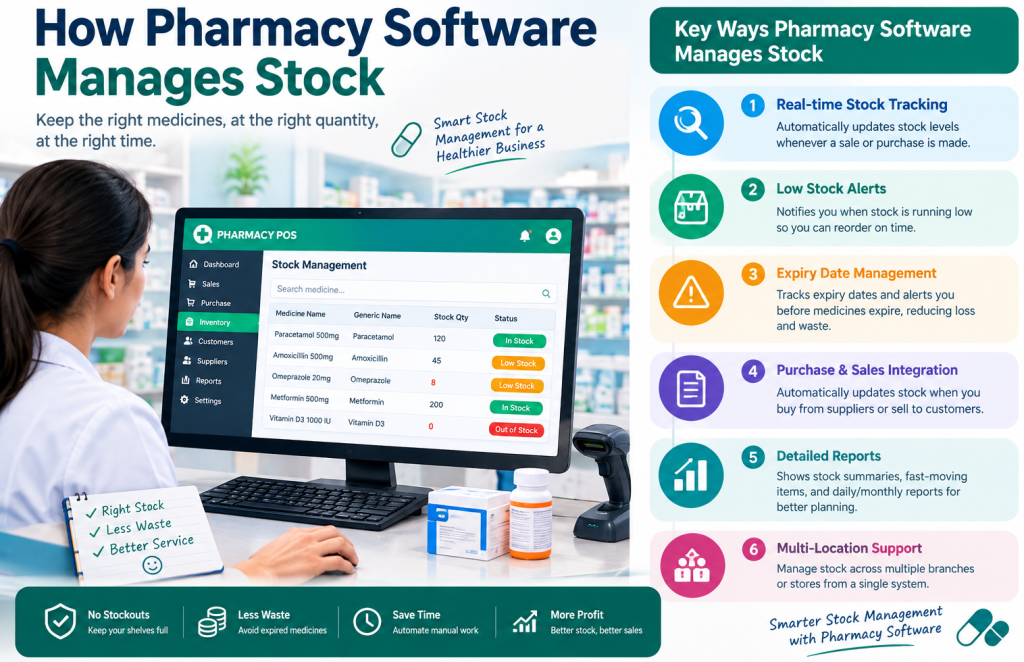
Managing medicine stock is one of the most important and challenging parts of running a pharmacy. A pharmacy may have hundreds or thousands of products, different batches, expiry dates, purchase prices, selling prices, and constantly changing stock quantities.
When stock is managed manually, it can become difficult to know exactly what is available, which medicines are running low, which products are close to expiry, and how much stock was sold or purchased.
This is where pharmacy software can help.
A modern pharmacy management system can connect purchases, sales, inventory, expiry dates, batches, and stock reports in one place. Instead of maintaining separate notebooks or spreadsheets, pharmacy staff can use a centralized system to keep track of medicine inventory.
What Is Pharmacy Stock Management?
Pharmacy stock management means keeping accurate records of the medicines and other products available in a pharmacy.
It involves knowing:
- What products are currently in stock
- How many units are available
- Which medicines were purchased
- Which medicines were sold
- Which products are running low
- Which medicines are approaching expiry
- Which batches are available
- How much stock is being used over time
Good stock management helps a pharmacy avoid both overstocking and stock shortages.
How Does Pharmacy Software Manage Stock?
Pharmacy software manages stock by connecting inventory with daily pharmacy activities.
A typical workflow looks like this:
Purchase Entry → Stock Added → Sales → Stock Reduced → Stock Reports
For example, if a pharmacy purchases 100 boxes of a medicine, the software can record the purchase and add the relevant quantity to inventory.
If 10 boxes are later sold, the system can update the available quantity accordingly.
Instead of manually calculating the remaining stock, the pharmacy can check the inventory record.
Stock Is Added Through Purchase Entries
When new medicines arrive from a supplier, staff can enter the purchase into the pharmacy software.
Depending on the system, the purchase record may include:
- Medicine name
- Quantity
- Purchase price
- Supplier
- Batch number
- Expiry date
- Selling price
- Purchase date
Once the purchase is recorded, the corresponding stock quantity can be added to inventory.
This creates a connection between purchasing and stock management.nding stock quantity can be added to inventory.
Stock Is Automatically Updated After Sales
One of the main advantages of pharmacy POS software is that sales can be connected directly with inventory.
Suppose your pharmacy has 50 units of a medicine.
If a customer purchases 3 units, the system can record the sale and update the available quantity to 47.
This reduces the need for staff to manually change stock records after every transaction.
However, software accuracy still depends on accurate product setup and correct transaction entry. Regular physical stock checks are also important.
Pharmacy Software Helps Track Medicine Batches
Many medicines are purchased in different batches.
A pharmacy may have the same medicine with:
- Different batch numbers
- Different purchase dates
- Different expiry dates
- Different purchase prices
A pharmacy inventory system can keep these details organized.
Batch-level information becomes particularly useful when pharmacy staff need to identify a particular batch or review stock approaching expiry.
Expiry Dates Can Be Recorded With Inventory
Medicine expiry is a major concern for pharmacy businesses.
If expiry dates are not properly recorded, products can remain unnoticed in storage until they become unusable.
Pharmacy software can store expiry information with the relevant stock or batch record.
This makes it easier for staff to review:
- Expired products
- Products approaching expiry
- Batch-wise expiry information
- Stock that needs attention
The software does not replace proper pharmacy procedures, but it can make expiry information much easier to organize and review.
Low-Stock Medicines Can Be Identified
Stock shortages can result in lost sales and unhappy customers.
Pharmacy software can help staff monitor current inventory levels and identify products that have reached a predefined minimum stock level.
For example:
Medicine: Paracetamol 500mg
Minimum Stock: 20 boxes
Current Stock: 15 boxes
The product can then be identified as needing restocking.
This allows pharmacy owners to make purchasing decisions based on actual inventory information instead of guessing.
Stock Reports Help Pharmacy Owners Understand Inventory
A good pharmacy management system should provide useful inventory reports.
Depending on the software, reports may include:
- Current stock report
- Stock valuation
- Purchase report
- Sales report
- Low-stock report
- Expiry report
- Product-wise sales
- Purchase history
- Stock movement
These reports can help pharmacy owners understand how inventory is changing over time.
How Does Pharmacy Software Prevent Stock Mistakes?
Manual stock management can create errors for several reasons.
For example:
A pharmacy receives 100 units but records only 90 units.
Later, the system may show 10 fewer units than the actual physical stock.
Similarly, if a sale is made but not recorded, the system may show more stock than is actually available.
Pharmacy software can reduce these types of problems by connecting transactions with inventory.
But software is not a replacement for good processes.
Pharmacy owners should still:
- Enter purchases correctly.
- Record every sale.
- Check stock regularly.
- Investigate unusual stock differences.
- Correct genuine data-entry mistakes.
- Maintain proper procedures for damaged or expired products.
How Pharmacy Software Helps With Fast-Moving Medicines
Not every medicine sells at the same speed.
Some medicines may sell every day, while others may remain in stock for a long time.
By reviewing sales and inventory data, pharmacy owners can identify fast-moving products.
This can help answer questions such as:
- Which medicines sell the most?
- Which products need frequent restocking?
- Which medicines are slow-moving?
- Which products are tying up inventory?
- Which medicines should receive more attention during purchasing?
This information can improve purchasing decisions.
How Pharmacy Software Helps With Slow-Moving Stock
Slow-moving inventory can tie up business capital.
For example, if a pharmacy purchases a large quantity of a product that sells very slowly, money remains invested in that inventory.
Sales and stock reports can help identify products with low sales activity.
Pharmacy owners can then review their purchasing strategy and avoid unnecessarily purchasing large quantities of products that do not move quickly.
How Does Stock Adjustment Work?
Sometimes the physical stock and software stock do not match.
For example:
Software Stock: 100 units
Physical Stock: 97 units
There could be several reasons for the difference, such as:
- Data-entry mistakes
- Damaged products
- Missing items
- Unrecorded transactions
- Counting errors
A pharmacy management system may provide stock adjustment functionality so authorized users can correct legitimate differences while maintaining an appropriate record of the adjustment.
Stock adjustments should not be used casually. Every adjustment should ideally have a clear reason and proper internal control.
Can Pharmacy Software Manage Expired or Damaged Stock?
Many pharmacy systems provide ways to record stock that is no longer available for sale, such as expired or damaged products.
The exact workflow depends on the software.
A pharmacy may need to:
- Identify the affected product or batch.
- Remove the quantity from saleable inventory according to its procedures.
- Record the reason for the adjustment.
- Maintain appropriate documentation.
- Follow applicable pharmaceutical and regulatory requirements for disposal.
The purpose of the software is to make the record-keeping process more organized.
Why Is Pharmacy Inventory Software Better Than Manual Stock Records?
Manual records can work for very small operations, but problems often increase as the pharmacy grows.
With notebooks or disconnected spreadsheets, it can become difficult to quickly answer:
“How much stock do we have right now?”
A connected pharmacy software system can provide a centralized view of inventory.
Manual method
Purchase → Write in notebook → Calculate stock → Make sale → Update notebook → Prepare report manually
Software-based method
Purchase → Inventory Update → Sale → Inventory Update → Report
The second workflow can save time and reduce repetitive manual calculations.
What Should a Pharmacy Look for in Inventory Software?
Not every pharmacy needs the same software.
Before choosing a pharmacy management system, check whether it supports the features your business actually needs.
Important areas to consider include:
Inventory Management
Can the system track current stock accurately?
Batch Management
Can you organize products by batch when required?
Expiry Management
Can staff easily review expiry information?
Purchase Management
Can purchases and supplier information be connected with inventory?
Sales and Billing
Does a sale update inventory correctly?
Low-Stock Monitoring
Can you identify medicines that need restocking?
Reports
Does the software provide useful stock and sales reports?
User Management
Can different staff members have appropriate access?
Backup and Data Security
How is your pharmacy data backed up and protected?
Training and Support
Can your staff receive proper training and technical support?
Is Pharmacy Software Useful for a Small Pharmacy?
Yes, but simplicity is important.
A small pharmacy may not need an overly complicated enterprise system.
It may primarily need:
- Fast billing
- Medicine search
- Stock tracking
- Purchase management
- Expiry management
- Basic reports
- Customer and supplier records
The best pharmacy software is not necessarily the software with the largest number of features. It is the software that solves the pharmacy’s actual problems without making daily work unnecessarily complicated.
How to Choose Pharmacy Software in Bangladesh
If you are searching for pharmacy software in Bangladesh, do not choose a system based only on advertisements or a feature list.
Ask the provider for a practical demonstration.
During the demo, test real pharmacy tasks such as:
- Add a medicine.
- Enter a purchase.
- Add batch and expiry information.
- Sell the medicine.
- Check the remaining stock.
- Search for low-stock products.
- Check expiry information.
- View purchase and sales reports.
- Make a stock adjustment.
- Check how the system handles backups.
This gives you a much better idea of whether the software fits your pharmacy.
PharmacyPOS BD for Pharmacy Stock Management
PharmacyPOS BD provides a pharmacy-focused software solution designed to help medical stores and pharmacies organize their day-to-day operations.
A pharmacy management workflow can bring important activities such as sales, purchases, inventory, customer management, supplier management, and reporting into one organized system.
If your pharmacy is currently managing stock through notebooks, Excel files, or disconnected records, moving to a dedicated pharmacy software system may make daily stock management easier and more structured.
Frequently Asked Questions
How does pharmacy software manage stock?
Pharmacy software manages stock by connecting purchases, sales, inventory records, and stock adjustments. When stock is purchased, the quantity can be added to inventory, and when products are sold, the available quantity can be reduced.
Can pharmacy software track medicine expiry dates?
Yes. Many pharmacy management systems allow expiry dates to be recorded with product or batch information, making it easier to review medicines approaching expiry.
Can pharmacy software track medicine batches?
Yes, depending on the software. Batch management can help pharmacies organize products with different batch numbers, purchase dates, and expiry dates.
How does pharmacy software help prevent stock shortages?
Pharmacy software can show current inventory levels and help identify products that have reached their minimum stock level. This allows pharmacy staff to plan purchases before important medicines run out.
Can pharmacy software reduce inventory mistakes?
It can reduce many manual calculation and record-keeping errors by connecting purchases and sales with inventory. However, accurate data entry and regular physical stock checks are still necessary.
Can pharmacy software manage expired medicines?
Many systems provide stock adjustment or related inventory functions for expired or damaged products. Pharmacies should also follow their applicable regulatory and operational procedures for handling and disposing of such medicines.
Is pharmacy inventory software useful for a small medical store?
Yes. A small medical store can benefit from inventory tracking, billing, purchase management, expiry monitoring, and basic reporting, especially when the software is simple and easy to use.
Is pharmacy POS software the same as pharmacy management software?
They can overlap, but they are not always exactly the same. POS software mainly focuses on sales and billing, while pharmacy management software may cover a broader range of operations such as inventory, purchasing, suppliers, customers, expiry management, and reporting.
What features should pharmacy inventory software have?
Useful features can include stock tracking, purchase management, sales integration, batch management, expiry tracking, low-stock monitoring, stock adjustments, reports, user management, and data backup.
How can I choose the right pharmacy software?
Start by identifying your pharmacy’s actual problems. Then compare inventory features, expiry management, billing, purchasing, reports, ease of use, training, support, and pricing. A live demo can help you evaluate whether the system fits your workflow.
Final Thoughts
Pharmacy stock management is not simply about knowing how many medicines are sitting on a shelf.
A pharmacy needs to understand its purchases, sales, current inventory, batches, expiry dates, low-stock products, fast-moving items, slow-moving items, and stock adjustments.
Pharmacy software can connect these activities and give pharmacy owners better visibility into their inventory.
The most important thing is to choose a system that is accurate, easy to use, suitable for your pharmacy workflow, and supported by proper training and support.
Before buying pharmacy software, test the actual workflow with a demo and make sure it solves the problems your pharmacy faces every day