1. Fast POS billing
Check medicine search, barcode workflow, quantity entry, discounts, invoice accuracy and compatibility with the printer used at your counter.

A practical guide for medical shops and pharmacies in Dhanmondi, Gulshan, Banani, Mirpur, Uttara, Mohammadpur, Narayanganj, Gazipur and Savar—covering billing, medicine inventory, batch and expiry tracking, purchases and business reports.

Choosing the best pharmacy management software in Dhaka is about more than generating a bill. A medical shop needs dependable sales records, clear stock movement, purchase tracking and a practical way to review medicine batches and expiry dates. The right system depends on the pharmacy’s size, staff workflow, hardware, budget and support requirements—not simply the number of features listed in an advertisement.
Pharmacy management software, also known as medical shop software or pharmacy POS software, helps organize routine pharmacy operations in one application. Depending on the product, it may include point-of-sale billing, medicine inventory, purchase entry, supplier records, customer records, batch and expiry information, and sales or stock reports. Verify every required feature in a live demo rather than assuming all systems include the same functions.
Check medicine search, barcode workflow, quantity entry, discounts, invoice accuracy and compatibility with the printer used at your counter.
Review stock on hand and how quantities change after sales, purchases, returns and adjustments. Test unit conversion for the units your pharmacy actually uses.
Ask how batches and expiry dates are recorded, searched and reported, and how staff can identify stock that needs review.
Test purchase entry, supplier information, purchase returns and supplier balances if they are part of your daily process.
Confirm availability of daily sales, item-wise sales, purchase history, low-stock and expiry reports, discounts and customer dues.
Understand who can access records, where backups are stored, how restoration works and what support is available if a computer fails.
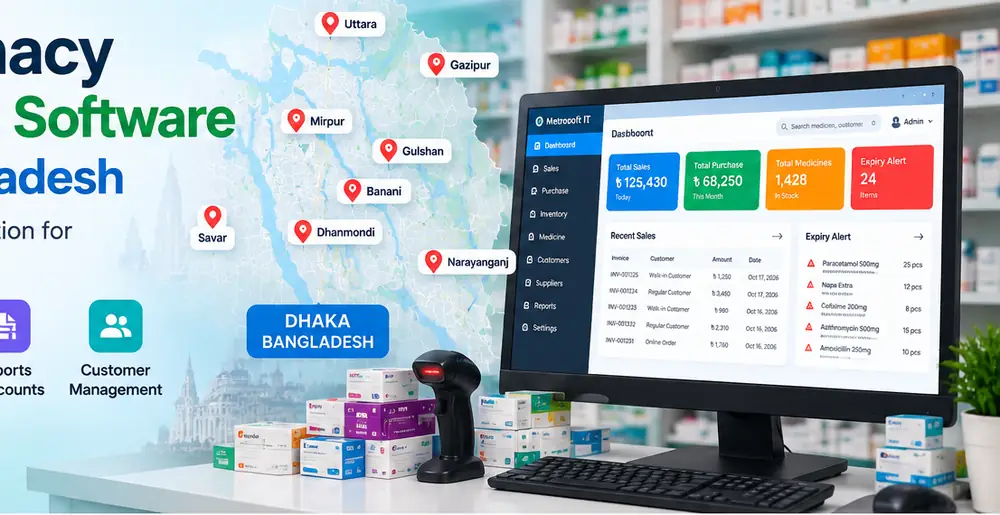
Pharmacies operate in many types of neighbourhoods, from residential streets and local markets to busy commercial districts. When evaluating pharmacy management software for a shop in any of these areas, focus on the actual workload, staff needs, connectivity, printer setup and support arrangements. The areas below are location targets for this guide, not a claim that Metrosoft IT maintains a physical office in each place.
For neighbourhood medical shops and busier pharmacies, evaluate whether billing is quick, medicine lookup is straightforward and stock changes are easy to review. Test common transactions using sample data before staff begin using the system for live sales.
Pharmacies with higher transaction volumes may prioritize fast search, consistent invoice printing, staff permissions, purchase records and clear daily summaries. Confirm that the software remains responsive with the product catalogue and number of users your shop expects.
For shops serving regular local customers, useful evaluation points include low-stock visibility, purchase history, customer records where needed and the ability to retrieve reports without complicated steps. Confirm whether the system supports the devices and printers already in use.
Pharmacies in these surrounding cities can use the same practical checklist: stock accuracy, supplier records, batch/expiry visibility, backup, training and after-sales support. If you operate more than one outlet, ask explicitly whether the product supports multi-branch operation and how data is synchronized; do not assume that capability is included.

Cloud software can support remote access when connectivity and service availability are suitable. Offline software may continue to work locally during an internet outage, depending on its design. A hybrid system may combine local operation and synchronization, but introduces additional questions about conflict handling, backup and device registration. Ask the vendor to demonstrate the exact workflow and limitations of the edition being offered.
Pharmacy POS BD provides a pharmacy-software evaluation route for businesses comparing medicine billing and management workflows. Before using any edition for live operations, review its current release notes, included features, system requirements, support terms and backup process. A product page or promotional description should not replace a hands-on test.
Request a demonstration and use your own checklist to verify billing, inventory, expiry review, purchase records and reports before making a decision.
Explore Pharmacy POS SoftwareContact Metrosoft ITThe best fit is the product that reliably supports your pharmacy’s billing, stock, purchase, expiry and reporting workflows within your budget. Test the current edition with realistic sample transactions before choosing.
These are location targets in this guide. Suitability depends on the software, hardware, connectivity and support arrangement for your individual shop; confirm the vendor’s service terms directly.
Capabilities vary. Ask the vendor to demonstrate how batch and expiry data are entered, searched, reported and updated in the version you intend to use.
Some products support multi-branch operations and some do not. Confirm branch permissions, central reporting, synchronization and offline behaviour before relying on a multi-location setup.
Pricing varies by product, licence, modules, number of devices or branches, training and support. Request a current written quote that explains included features and recurring charges.
Test sales, purchases, returns, stock calculations, expiry reports, invoice printing, user permissions and backup restoration using sample data first.
Features, pricing, support availability and multi-branch capabilities vary by product and edition. Confirm details with the vendor before purchase. This article is an informational buying guide and does not claim physical offices or exclusive service coverage in every listed area.
FREE SOFTWARE DOWNLOAD
Complete the short form to access the available pharmacy software download.